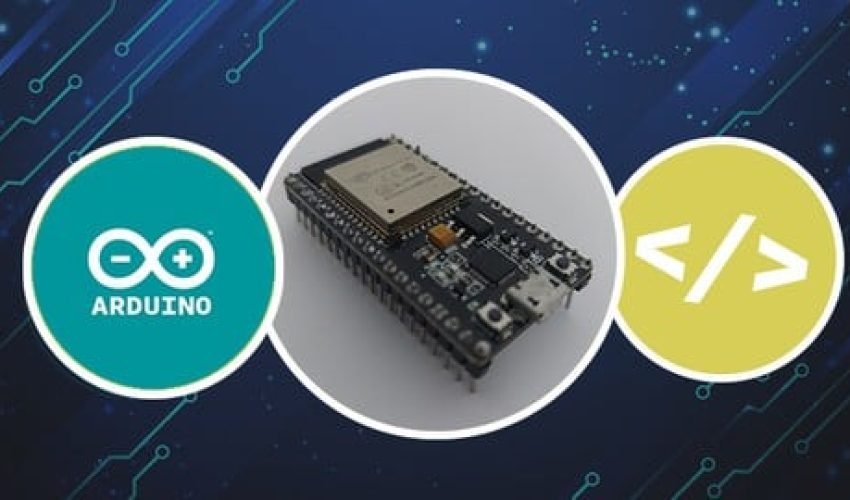
ESP32: A Beginner’s Guide to IoT and Electronics
Get unlimited access to all learning content and premium assets Membership Pro
Don’t just write software—build physical systems. Learn to wire circuits, write microcontroller code, and deploy secure, web-connected IoT devices using the powerful ESP32 board and the Arduino framework.
Course Description
Software is only half the story. The future belongs to connected hardware.
For years, coding was confined to flat glass screens. Today, the physical world is waking up. Smart appliances, automated agriculture, industrial monitors, and wearable health tech are transforming how we interact with our environment. The bridge connecting these physical objects to the digital cloud is the Internet of Things (IoT).
But if you have ever tried to learn electronics, you probably got bogged down in intimidating circuit math, expensive hardware lists, or confusing assembly code. Many courses assume you are already an electrical engineer, leading to fried microcontrollers and endless debugging frustration.
ESP32: A Beginner’s Guide to IoT and Electronics is a practical, step-by-step introduction designed to make hardware development accessible to absolute beginners.
Using the highly popular, low-cost, and dual-core ESP32 microcontroller (which features built-in Wi-Fi and Bluetooth), this course turns abstract concepts into physical reality. You will start by installing your programming environment and mastering basic electrical concepts. Step-by-step, you will progress from blinking a single onboard LED to reading digital and analog sensors, displaying real-time data on an OLED screen, and hosting responsive local web servers. By the time you complete this course, you will have built a functional home automation system and gained the confidence to design, wire, and code your own custom IoT creations.
What You’ll Learn
-
ESP32 Hardware Mastery: Decode pinout diagrams, navigate GPIO (General Purpose Input/Output) configurations, and understand safe 3.3V power routing.
-
Arduino IDE 2.0 Integration: Configure your computer to seamlessly write, compile, and upload C/C++ scripts to the ESP32 chip.
-
Foundational Electronics: Learn to read schematics, use solderless breadboards, and safely wire essential components like resistors, transistors, and relays.
-
Sensor & Actuator Control: Interface with physical sensors (like the DHT22 for temperature/humidity) and drive physical outputs (like servo motors and RGB LEDs).
-
Wired & Wireless Protocols: Understand how the ESP32 communicates locally using I2C and SPI, and connect it to wireless networks over Wi-Fi.
-
Local IoT Web Server: Build and host a mobile-responsive web dashboard running directly on the ESP32 to monitor data and switch physical devices on/off remotely.
Skills You’ll Gain
-
Microcontroller Programming (C/C++ in Arduino Framework)
-
Practical Circuit Prototyping & Wiring
-
Sensor Data Acquisition & Calibration
-
Local Network & Wi-Fi Server Architecture
-
Debugging Hardware & Electronic Signals
- Format: 100% Online, Self-Paced
- Video Content: 7.5 Hours of Clear, Code-Along Screen Tutorials
- Modules: 8 Carefully Structured Sections
- Resources: 95 Practical Lectures, Curated Circuit Diagrams, and Complete Code Templates
- Access: Full Lifetime Access on Mobile, Tablet, and Desktop
- Programming Beginners & Makers who want to step out of pure software and explore the rewarding world of physical computing.
- Computer Science & Engineering Students looking to quickly master the ESP32 platform for academic or personal hardware projects.
- Home Automation Enthusiasts who want to move beyond off-the-shelf consumer products and build custom smart-home sensors.
- Educators and Hobbyists seeking a clean, structured, and easy-to-follow learning path for modern microcontrollers.
- A computer running Windows, macOS, or Linux with internet access to download the free Arduino IDE 2.0.
- An ESP32 Development Board (e.g., ESP32 DevKit V1) and basic prototyping components (solderless breadboard, micro-USB or USB-C cable, LEDs, resistors, jumper wires, and a DHT22 sensor).
- No prior background in electronics, engineering, or programming required. We start completely from scratch.
- 9 Sections
- 95 Lessons
- 7 Hours
- An Introduction to the course3
- Introduction to IoT & ESP326
- Getting Started with Arduino 2.0 & ESP3211
- 3.1Arduino 2.0
- 3.2Installing Arduino IDE into a Linux System
- 3.3Installing Arduino IDE into Windows
- 3.4Installing Arduino IDE into MacOS System
- 3.5Installing ESP32 Board into Arduino IDE 2.0
- 3.6Features of Arduino IDE 2.0
- 3.7Installing Libraries into Arduino IDE 2.0
- 3.8Arduino C Basics – Part 1
- 3.9Arduino C Basics – Part 2
- 3.10Link for the ESP32 Board
- 3.11Quiz
- Basic Electrical Concepts and other features of ESP3216
- 4.1Overview
- 4.2Ohm’s Law
- 4.3Resistance
- 4.4Digital & Analog Pins
- 4.5Pull Up and Pull Down Resistors
- 4.6Blink Code Demo
- 4.7Button + LED Wiring
- 4.8Button + LED Demo
- 4.9Analog Read Circuit Setup
- 4.10Analog Read Demo 1
- 4.11Analog Read Demo 2
- 4.12Bouncing Demonstration
- 4.13Debouncing Demonstration
- 4.14Documentation
- 4.15Blink a LED!!
- 4.16Find the resistance
- PWM, DAC, and Interrupts14
- Wired Communication with ESP3215
- Wireless Communication with ESP3215
- 7.1Common Terminologies
- 7.2Brief about Bluetooth
- 7.3Brief about WiFi
- 7.4Bluetooth Demonstration – Part 1
- 7.5Bluetooth Demonstration – Part 2
- 7.6Bluetooth Demonstration – Part 3
- 7.7Wiring for Blynk Demonstration
- 7.8Blynk Demonstration – Part 1
- 7.9Blynk Demonstration – Part 2
- 7.10AP Mode Demonstration – Part 1
- 7.11AP Mode Demonstration – Part 2
- 7.12STA Mode Demonstration – Part 1
- 7.13STA Mode Demonstration – Part 2
- 7.14Documentation
- 7.15Quiz
- Real Time Operating Systems9
- Capstone Project6
Get unlimited access to all learning content and premium assets Membership Pro
"The absolute best entry point for programmers wanting to learn hardware." "I have been a software developer for three years, but circuits always felt like a black box. This course made the hardware side feel incredibly logical. The instructors show you exactly why we use specific resistors, and the code-along format for the Wi-Fi web server was flawless. I finally built my own smart plant monitoring system!" — Liam K., Software Engineer
You might be interested in
-
All levels
-
9313 Students
-
43 Lessons
-
Intermediate
-
7639 Students
-
0 Lessons
-
Beginner
-
14285 Students
-
0 Lessons
-
All levels
-
8952 Students
-
0 Lessons
Sign up to receive our latest updates
Get in touch
Call us directly?
Address